MacUpdate
Join MacUpdate
New Member

New Developer
Explore
MacUpdate Desktop
Hot Apps

Business
Dashboard
Development
Drivers
Education
MacUpdate Promo
Popular Apps

Games
Home & Personal
Internet
Multimedia & Design
Utilities
iPhone
Apps

Login
Member Login

Developer Login
About
Search Mac Apps

Search iPhone Apps

Advanced Search
TrafficCamNZ
TrafficCamNZ 1.1.3
Your rating: Now say why...

0

View traffic camera footage.   Commercial ($1.99)
Add to my Watch List
Email me when discounted
  • Buy
    APP STORE
  • Visit Developer's Site
    David Wilson
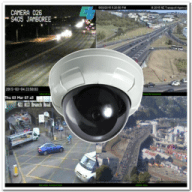
TrafficCamNZ displays internet accessible pictures of Traffic Cameras. You could use it for any image, even weather maps.

Images you choose as "Featured" are downloaded and displayed on screen in a configuration of 1, 4, or 16 images per screen, you can scroll the screen left and right.

TrafficCamNZ is also available on the iPhone, iPad, and iPod Touch.

TrafficCamNZ now contains details of more than 5000 cameras from around the world. You choose which cameras are the "featured" ones.Managing your own personal list of cameras is easy too via the add new camera
What's New
Version 1.1.3:
  • Fixes a crash on the camera edit screen when the user tries to save or cancel or delete and the image has not finished retrieving
  • Fixed an issue where the main window contents could disappear when a cmd-w was sent
  • Fixed an issue where duplicate camera entries could cause a crash while trying to display their images on the main screen
  • Fixed an issue where timelapse movies could not be created due to the application writing a temporary file outside of the Application sandbox
  • Fixed some object memory handling to prevent unexpected application crashes
  • Changed Appliction build from 32 bit only to 32/64 bit
Version 1.1.3:
  • Fixes a crash on the camera edit screen when the user tries to save or cancel or delete and the image has not finished retrieving
  • Fixed an issue where the main window contents could disappear when a cmd-w was sent
  • Fixed an issue where duplicate camera entries could cause a crash while trying to display their images on the main screen
  • Fixed an issue where timelapse movies more...
Requirements
Intel, Mac OS X 10.6.6 or later


MacUpdate - TrafficCamNZ


  • iScan
    +1
    Commercial $.99
    Listen to police and fire ...
TrafficCamNZ User Discussion (Write a Review)
ver. 1.x:
Your rating: Now say why...
Overall:

sort: smiles | time
There are currently no reviews or comments. Write a comment or review now.

There are currently no troubleshooting comments. If you are experiencing a problem with this app, please post a comment.

There are currently no ratings. Write a comment or review now.

Downloads:459
Version Downloads:85
Type:Internet : Internet Utilities
License:Commercial
Date:06 Feb 2012
Platform:Intel
Price: $1.99
Overall (Version 1.x):
Features:
Ease of Use:
Value:
Stability:
-
-
-
Please login or create a new
MacUpdate Member account
to use this feature
Watch Lists are available to
MacUpdate Desktop Members
Upgrade Now
Download and auto-install
using MacUpdate Desktop. Save
time moving folders and cleaning-up.
TrafficCamNZ displays internet accessible pictures of Traffic Cameras. You could use it for any image, even weather maps.

Images you choose as "Featured" are downloaded and displayed on screen in a configuration of 1, 4, or 16 images per screen, you can scroll the screen left and right.

TrafficCamNZ is also available on the iPhone, iPad, and iPod Touch.

TrafficCamNZ now contains details of more than 5000 cameras from around the world. You choose which cameras are the "featured" ones.Managing your own personal list of cameras is easy too via the add new camera screen. Cameras can be bulk imported and exported.

Usage Notes:
  • Pictures are displayed in the order they are received unless you set the image sequence number, you can then order the images how you want them
  • Images are not cached, if you receive an image that isn't right (i.e. daylight when you know it is night time, that camera may not be functioning)
  • Sometimes the traffic camera pictures are not up-to-date. You may see night pictures when it is supposed to be daylight or perhaps pictures don't change. TrafficCamNZ has no control over that
  • You receive updates to the camera list automatically; a check is performed every 7 days when the application starts
  • Click the image on the main window to display it full screen
Features:
  • Load your own web images
  • Use the same camera list on the iPhone, iPad, and iPod Touch for seeing images while you're on the move!
  • Allows XML import and export of camera list
  • Camera list (XML Import file) can be updated from a web site - doesn't require the release of a new application
Add/Update Listing About MacUpdate Desktop Career Opportunities RSS Twitter Facebook Advertise Sitemap
Copyright © 2012 MacUpdate LLC


- -